Issuing Inventory Based on On-Hand Stock or Available Stock Quantity Only
When stock requisitions are enabled, sellers can issue products in invoices and POS receipts while the requisition remains pending for a period until it is approved. Accordingly, the product quantities in the inventory don’t decrease until the related requisitions are approved, which means there is sometimes a gap between the products sold and the quantity in the inventory (the available stock). What if you want to reserve the product quantity issued in invoices and POS before the requisition is approved?
This is what you can now control through the setting of evaluating inventory based on the actual (available) stock quantity.
Where Do I Find the Pending Stock (Pending Products)?
Pending stock is the product quantity that was issued in a sales invoice or a POS receipt and whose requisition hasn’t been approved yet. It appears on the product page along with On Hand Stock and Available Stock, after enabling Display On-Hand and Available Stock from the inventory settings. To follow up on the pending requisitions, open Inventory → Manage Requisitions and search for the requisitions with the status Under Delivery.
Controlling the Inventory Evaluation Method
By enabling the Display On-Hand and Available Stock setting, which helps control the inventory evaluation method, you can track the stock quantity of the product reserved due to a sales invoice before the requisition is approved, but the difference lies in the action taken toward this quantity of the product.
You can choose the evaluation to be based on:
- On Hand Stock: Here, the pending quantity of the product appears on its page, but you won’t be prevented from selling or transferring this quantity of the product despite it being pending.
- Available Stock: Here, issuing a sales invoice with a quantity exceeding the actually available stock quantity is prevented, even if this quantity doesn’t exceed the total quantity of the product present before the requisition is approved.
This becomes clearer through the upcoming examples in this guide.

Evaluating Inventory Based on the Total Stock Quantity
To enable the “Display On-Hand and Available Stock” setting, click “Inventory & Products Settings“ from the dropdown of “Inventory” in the main menu, and click the card “Products Settings“ then enable the setting
And choose the evaluation method “Validate Stock By Available Quantity”

Here the product “Copper Earrings” appears, and its on-hand stock is 10 pieces

Here we created an invoice for one piece of the same product

After creating the invoice, we find the invoice’s requisition with the status “Under Delivery”.

After that, we find the product page as follows:
- On Hand Stock: 10 as it is, since the requisition hasn’t been approved yet.
- Pending Stock: 1, which is the quantity resulting from the invoice whose requisition hasn’t been approved.
- Available Stock: 9, which is the actual quantity, since the piece sold in the invoice is considered sold, and only the requisition approval remains.

When trying to create an invoice with the product’s total quantity “10”, it is approved, since evaluating the inventory based on the on-hand stock doesn’t take the pending stock of the product into account, unlike what happens when the setting of evaluating the inventory based on the available stock is enabled.

After that, we find the product page as follows:
- On Hand Stock: 10 as it is, since the requisitions of the two previous invoices haven’t been approved yet.
- Pending Stock: 11, which is the quantity resulting from the two invoices whose requisitions haven’t been approved.
- Available Stock: -1, which is the actual quantity, since the quantity of products issued in the invoices whose requisitions haven’t been approved exceeded the available quantity of the products by one piece of the product.

Evaluating Inventory Based on the Available Stock
To enable the “Display On-Hand and Available Stock” setting, click “Inventory & Products Settings“ from the dropdown of “Inventory” in the main menu, and click the card “Products Settings” then enable the setting “Display On-Hand and Available Stock”
And choose the evaluation method “Available Stock (Excluding Reserved Quantities)”

Here the product “Silver Earrings” appears, and its on-hand stock is 10 pieces.

Here we created an invoice for one piece of the same product

After creating the invoice, we find the invoice’s requisition with the status “Under Delivery”.

After that, we find the product page as follows:
- On Hand Stock: 10 as it is, since the requisition hasn’t been approved yet.
- Pending Stock Quantity: 1, which is the quantity resulting from the invoice whose requisition hasn’t been approved.
- Available Stock: 9, which is the actual quantity, since the piece sold in the invoice is considered sold, and only the requisition approval remains.

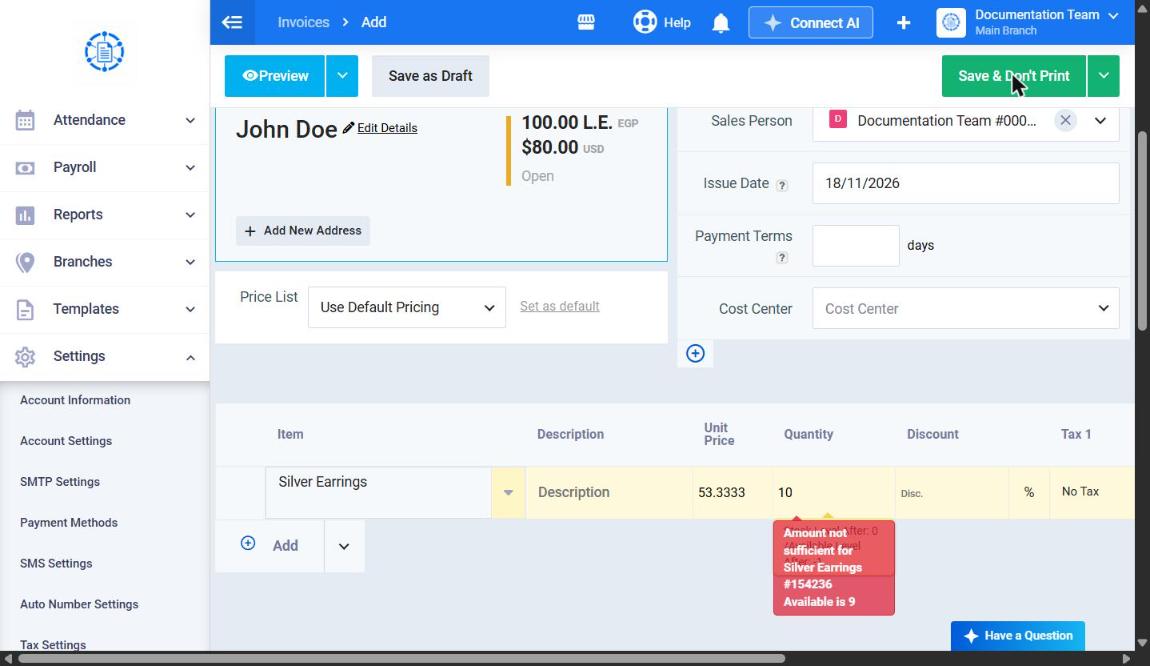
When trying to create an invoice with the product’s total quantity “10”, the invoice isn’t approved and a message appears indicating that this quantity exceeds the actual quantity available for the product, since evaluating the inventory based on the product’s available stock takes the pending quantity into account, unlike what happens when the setting of evaluating the inventory based on the on-hand stock is enabled.