


How to Delete an Advance Payment and Restore It from the Trash
When you delete an advance payment invoice, it isn’t deleted permanently right away. It moves to the Trash and stays there for 90 days, during which you can restore it. If the advance payment is distributed to sales invoices, the system asks you to confirm the deletion because the distribution will be removed. This tutorial explains how to delete an advance payment, what happens after deletion, and how to restore it from the Trash or delete it permanently.
Before You Start
- To delete the advance payment: permission to edit and delete invoices (all invoices, or the invoices you created).
- To open the Trash and restore or permanently delete the advance payment: the Manage Deleted Sales Transactions permission.
- The advance payment date must not be within a closed financial period.
Steps to Delete an Advance Payment
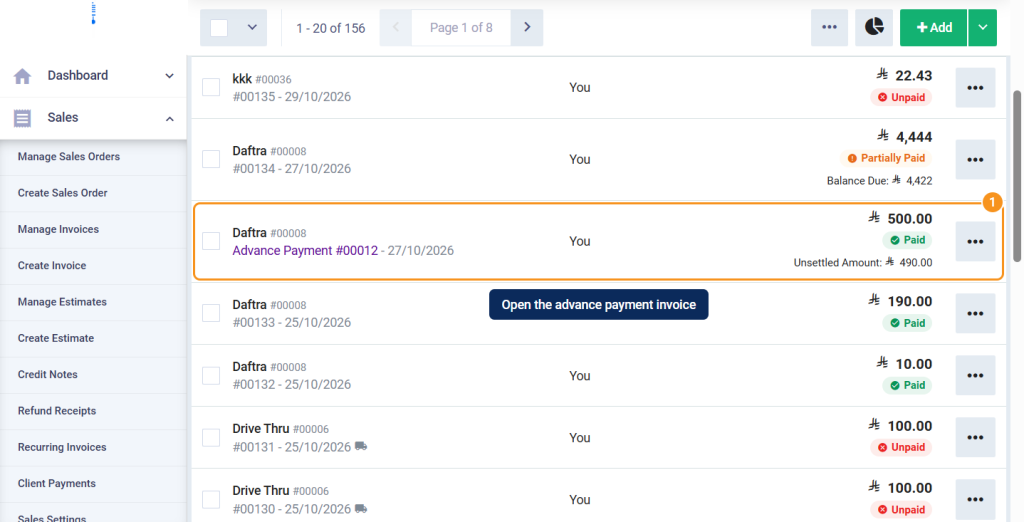
- From the main menu, select Sales, then Manage Invoices, and open the advance payment invoice you want to delete.
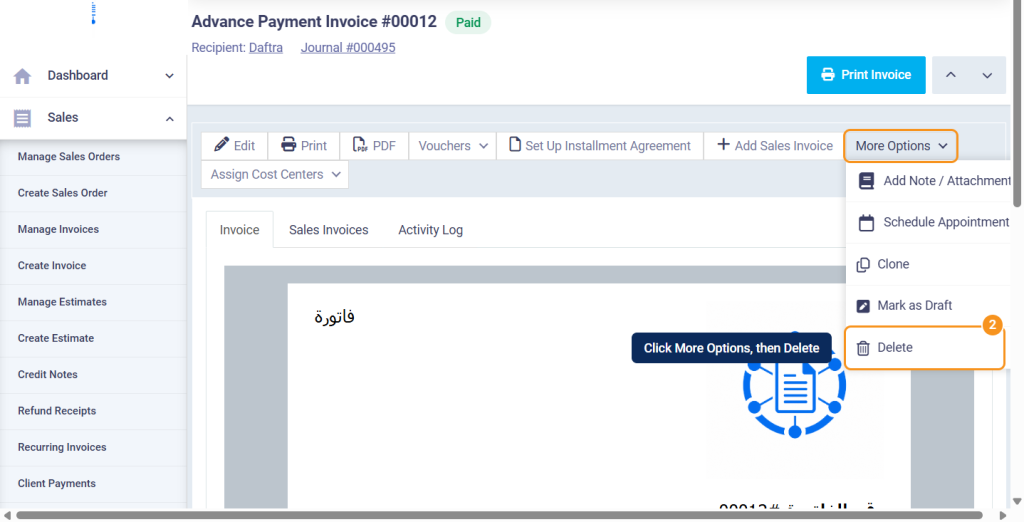
- Click More Options, then Delete.
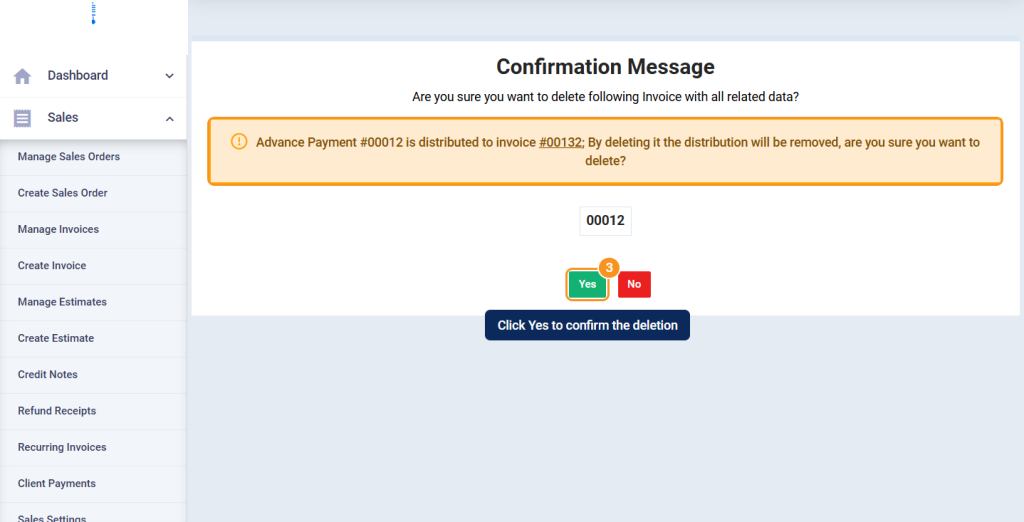
- The delete confirmation page opens. If the advance payment is distributed to a sales invoice, the message Advance Payment #… is distributed to invoice …; By deleting it the distribution will be removed, are you sure you want to delete? appears. Click Yes to confirm the deletion.
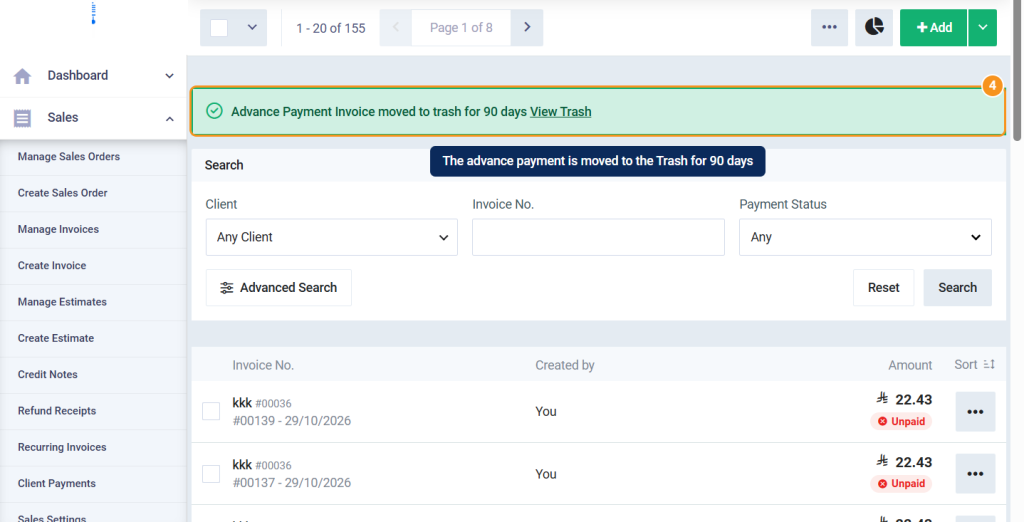
- A message appears confirming that the advance payment was moved to the Trash for 90 days, with a View Trash link.
What Happens After Deletion
| Item | What happens on deletion |
|---|---|
| Advance payment invoice | Moves to the Trash and stays there for 90 days, then is deleted permanently and automatically. |
| Advance payment’s payments | Are suspended along with the advance payment, and return to their previous status when it’s restored. |
| Journal entry of the advance payment and its payments’ entries | Are deleted, and recreated on restore. |
| Distribution of the advance payment to sales invoices | Is deleted permanently and doesn’t come back on restore. |
| Sales invoices the payment was distributed to | The paid amount, balance due, and payment status of each invoice are recalculated, so its status may change from Paid to Partially Paid or Unpaid. |
Steps to Restore an Advance Payment from the Trash
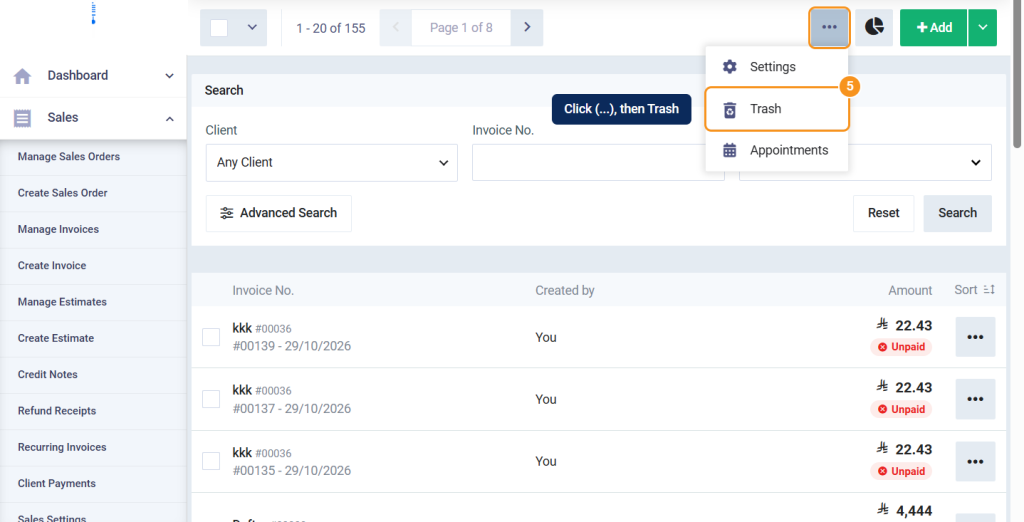
- From the Manage Invoices page, click the menu button (…) at the top of the page, and select Trash.
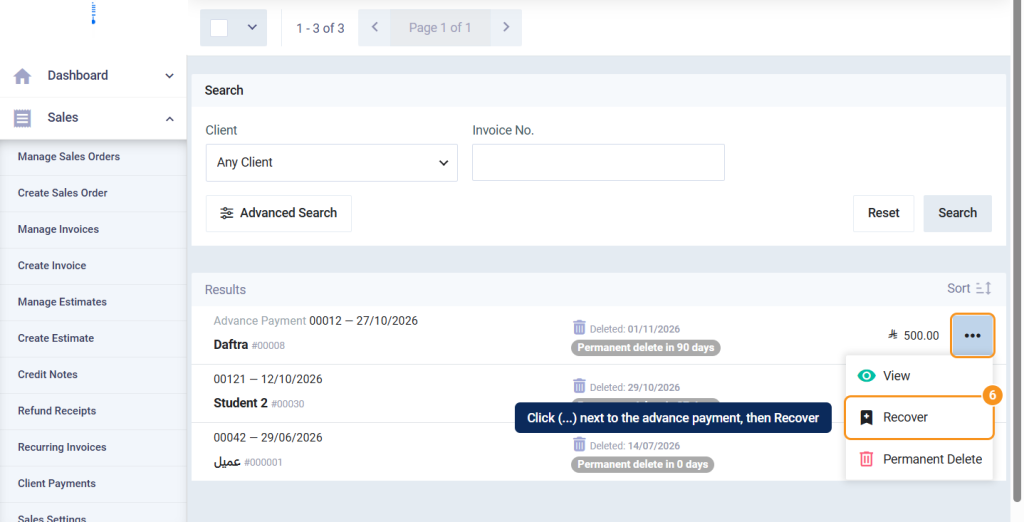
- On the Deleted Items page, click (…) next to the advance payment, then Recover. You can also open the deleted advance payment and click Recover from its page.
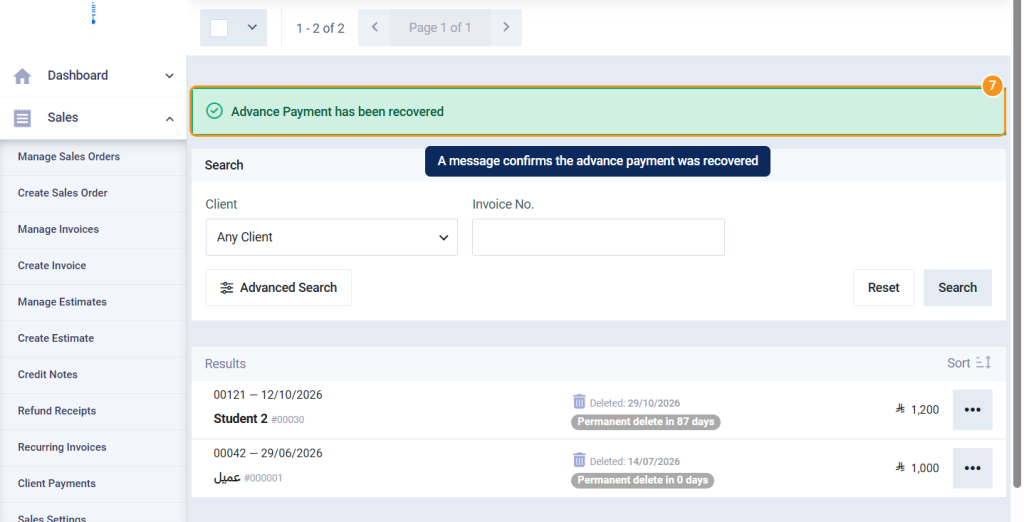
- In the confirmation message Are you sure you want to recover this record?, confirm the restore. The message Advance Payment has been recovered appears.
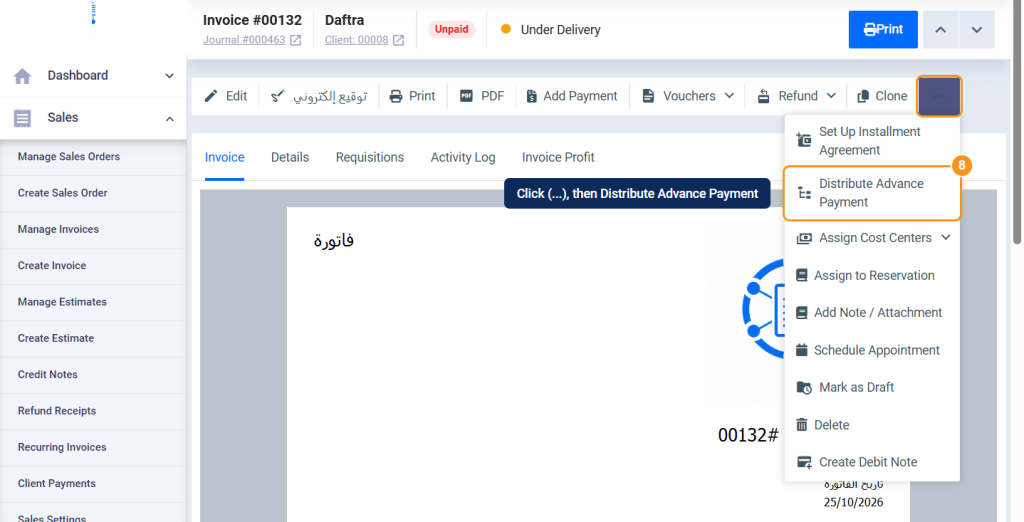
- If the advance payment was distributed before you deleted it, distribute it again: open the sales invoice, click (…), then Distribute Advance Payment. For details, see Distribute an Advance Payment Across a Sales Invoice.
Permanent Deletion
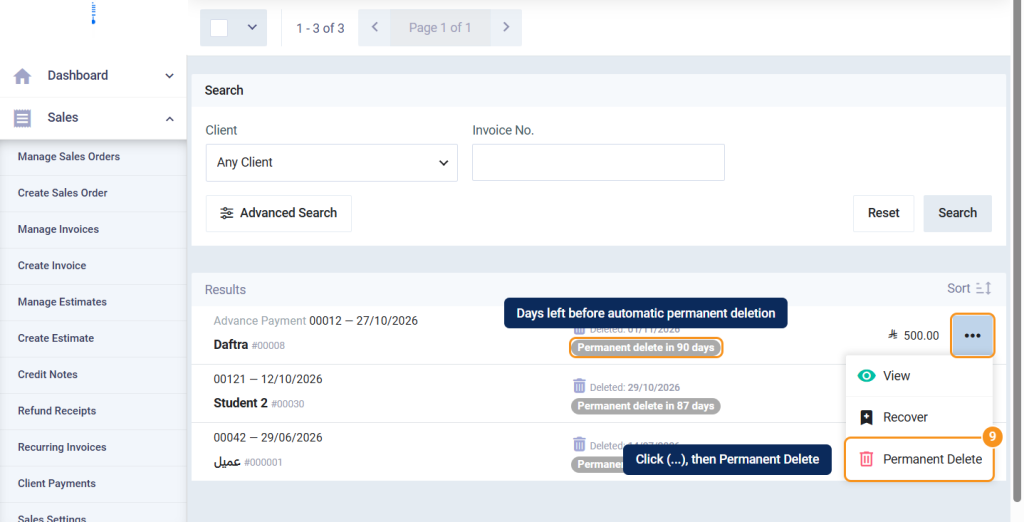
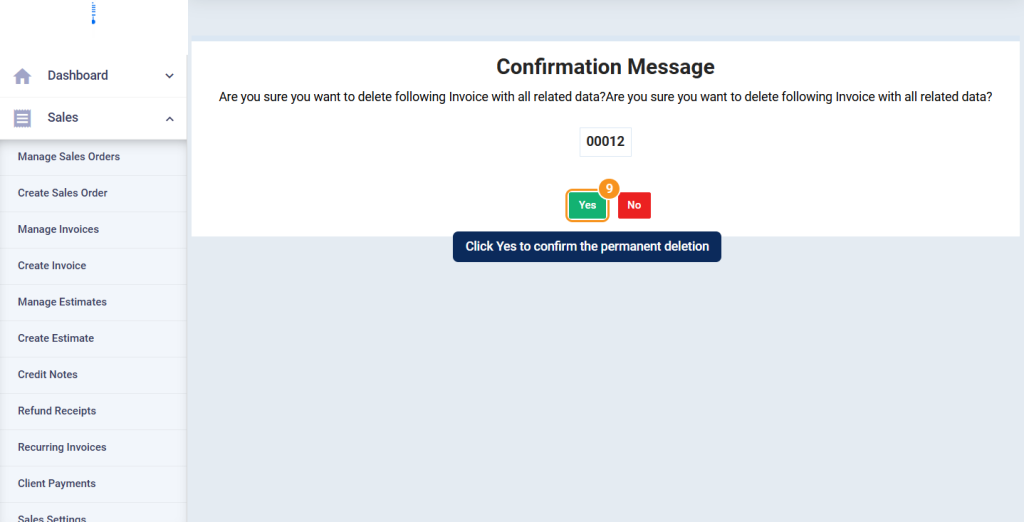
- To delete the advance payment permanently before the period ends, click (…) next to it in the Trash, then Permanent Delete, and confirm the message Are you sure you want to delete the following invoice with all related data?
When Deleting or Restoring Isn't Possible
| Case | What happens |
|---|---|
| The advance payment date is within a closed financial period. | You can’t delete or restore it until the period is opened. |
| The advance payment is linked to a refund, credit note, or debit note. | You can’t delete it; delete the linked documents first. |
| The advance payment was sent to and accepted by the e-invoicing system. | You can’t delete it. For Saudi e-invoicing (ZATCA), create a credit note to cancel it instead of deleting it. |
| You don’t have permission to delete invoices, or the Manage Deleted Sales Transactions permission. | You can’t delete, or you can’t open the Trash, restore, or delete permanently. |
FAQs
Does the advance payment's distribution come back when I restore it?
No. The distribution is deleted permanently when you delete the advance payment. After restoring it, distribute it again from Distribute Advance Payment in the sales invoice.
How long does the advance payment stay in the Trash?
It stays for 90 days from the deletion date, then the system deletes it permanently and automatically. You can delete it permanently before that with Permanent Delete.
Why doesn't the Trash option appear?
Because you don’t have the Manage Deleted Sales Transactions permission, or because the Trash doesn’t contain any deleted invoice or advance payment.
Does the sales invoice status change after deleting an advance payment distributed to it?
Yes. The invoice’s paid amount and balance due are recalculated, so its status may change from Paid to Partially Paid or Unpaid.